







Key Features
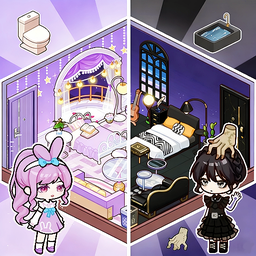
- Color wheel madness: Every single furniture piece lets you tweak the hue. You can match your couch to your shoes perfectly.
- Character style depth: Multiple layers of clothing mean you can mix tops and bottoms. It prevents your character from looking basic.
- Spatial layout freedom: Place items anywhere on the grid. Just watch out for overlapping hitboxes that make things pop out of place.
- Pose snapshots: Lock your character into a pose to finish the scene. It changes the mood of the whole room.
How to Play
Mastering the Vero World controls
Use your mouse to drag and drop items into your scene. The Vero World controls are simple, but lining up furniture against walls feels finicky at first. Just take your time. Learning how to play Vero World is mostly about clicking through the menus until you find your vibe.
Why Vero World poses matter
After you decorate, click your character to cycle through different poses. It brings the room to life. Don't worry if your first house looks like a total disaster. Everyone starts with ugly wallpaper. You will eventually unlock better lighting options that make your creations look much less like a budget warehouse.
Who Should Play Vero World?
Frequently Asked Questions about Vero World
Can I play Vero World on my phone?
Yes, it works fine on mobile screens. The touch controls are responsive enough for decorating, though dragging small items can be a bit annoying on tiny displays.
How do you save your designs in Vero World?
The game saves your current progress automatically as you place items. If you refresh the page or leave, your house stays exactly how you left it.
Is Vero World free to play?
Yes, Vero World is completely free to play on Nub Games. There are no in-app purchases. No download or registration required.
Can I play Vero World on mobile?
Vero World works on both desktop and mobile devices. Best played in landscape mode.
What age rating is Vero World?
The catalog age rating for Vero World is 6+.