




Key Features
- Logical deduction: Every puzzle has one solution. You start with prime numbers to carve off strips, then solve the remaining space step by step.
- Visual themes: Switch between various color palettes. Choose a look that suits your mood.
- Cloud progress: Your game state saves to the cloud. Pick up where you left off later.
- Daily challenges: A new puzzle waits every day.
How to Play
Split into Rectangles: Basic mechanics
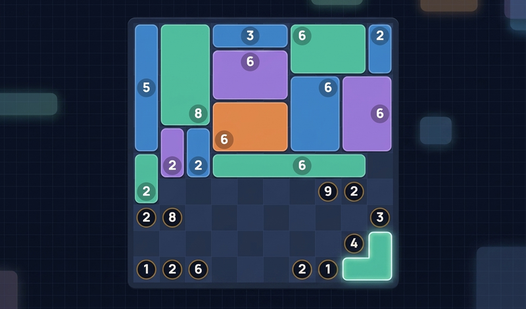
To learn how to play Split into Rectangles, drag a frame across the grid or tap two opposite corners. Every rectangle you create must contain exactly one number. That digit represents the total cell count of its shape. If you make a mistake, simply undo the move or restart the level.
Split into Rectangles controls
On a desktop, click and drag to define your shapes. If you are using a mobile device, drag your finger across the cells to draw your boundaries. Because rectangles cannot overlap and must fill the entire field, plan your cuts carefully to ensure no empty cells remain.
Who Should Play Split into Rectangles?
Frequently Asked Questions about Split into Rectangles
Can I play Split into Rectangles on my phone?
Yes, the game is fully supported on mobile devices. You can drag your finger across the screen to draw your rectangles and solve the puzzles on the go.
What are the controls for Split into Rectangles?
The Split into Rectangles controls involve dragging a frame from cell to cell or tapping two opposite corners. These inputs allow you to define the shape and size of each rectangle.
Is Split into Rectangles free to play?
Yes, Split into Rectangles is free to play on Nub Games. No download or registration required.
What age rating is Split into Rectangles?
The catalog age rating for Split into Rectangles is 0+.