










Key Features
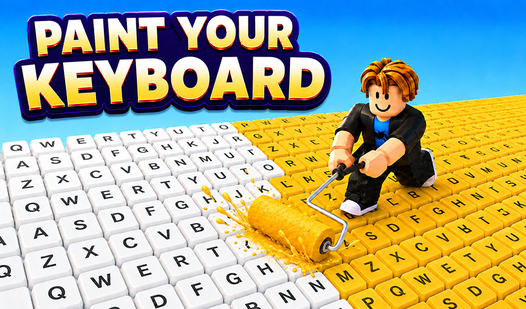
- Expansion Mechanics: Open new areas of the keyboard to grow your field. You need constant additions to turn a small space into a huge, bright workshop.
- Worker Recruitment: Hire additional staff to press keys alongside you. They take the pressure off your own movement.
- Roller Customization: Increase the width of your roller. This change allows you to paint more keys with every pass.
How to Play
Mastering the Paint Your Keyboard controls
On desktop, use WASD to move your character. Hold the right mouse button to rotate the camera. You must visit the paint tank to fill your roller before you can color any keys. Learning how to play Paint Your Keyboard involves balancing your movement with frequent trips to the tank for supplies.
Upgrading in Paint Your Keyboard
Spend your hard-earned cash to boost your movement speed or increase your roller width. Buying these upgrades helps you cover more keys in less time. You can also hire workers to assist you in painting. Constant development of your workshop is the only way to reach new areas of the board.
Who Should Play Paint Your Keyboard?
Frequently Asked Questions about Paint Your Keyboard
How do you fill your roller in Paint Your Keyboard?
You must walk your character over to the paint tank located on the map. This action replenishes your supply so you can continue painting the keyboard keys.
Can I play Paint Your Keyboard on my phone?
Yes, the game is supported on mobile devices. You use a joystick for movement and swipe on the screen to rotate the camera view.
Is Paint Your Keyboard free to play?
Yes, Paint Your Keyboard is free to play on Nub Games. Optional in-app purchases are available. No download or registration required.
What age rating is Paint Your Keyboard?
The catalog age rating for Paint Your Keyboard is 6+.