








Key Features
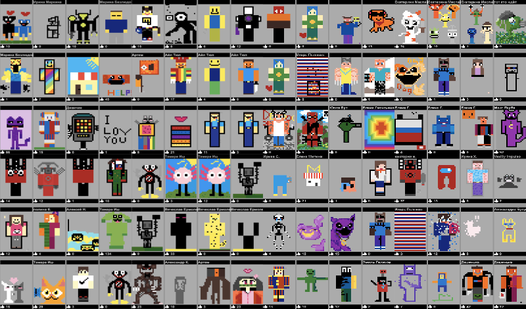
- Global Gallery: Your art hits the leaderboard for everyone to see. It feels great when you finally crack the top ten.
- Persistent Canvas: Edit your old sketches whenever you want. You can always go back and fix those weird proportions later.
- Simple Palette: The limited color choices prevent you from overthinking the design. It keeps the focus on your basic shapes.
- Public Feedback: See what others are drawing in real time. It is a quick way to get inspiration from for-teens artists.
How to Play
Mastering Notepad tools
Use your mouse or touchscreen to select brushes and colors. The Notepad controls are straightforward, but you should expect some jitter if you are using a trackpad instead of a pen. It is how to play Notepad without losing your mind over line smoothing.
Sharing your Notepad work
Once you finish, hit the upload button to submit your creation to the world. Don't worry about being a professional artist. Most people just scribble anyway. Just keep in mind that the interface can be a bit cramped on smaller screens, making tiny details a nightmare to finalize.
Who Should Play Notepad?
Frequently Asked Questions about Notepad
Can I play Notepad on my phone?
Yes, it works fine on mobile devices. You just tap the screen to draw, though you might find your finger covers up the line you are currently making.
Does Notepad have multiplayer?
Not in the traditional sense, but you compete for spots on the global leaderboard. You are technically sharing the same world space as every other player.
Is Notepad free to play?
Yes, Notepad is free to play on Nub Games. Optional in-app purchases are available. No download or registration required.
What age rating is Notepad?
The catalog age rating for Notepad is 6+.