

















Key Features
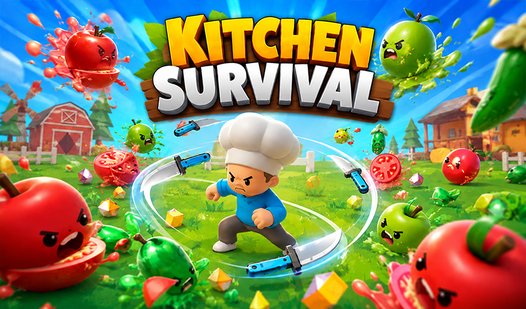
- Scaling Difficulty: The density of enemies increases the longer you survive. This forces you to navigate tighter spaces.
- Upgrade System: Filling your experience bar lets you choose improvements. Select items like boomerangs or faster reload speeds to bolster your defense.
- Chef Upgrades: You can strengthen your chef to handle future waves. This is essential for long runs.
How to Play
Mastering Kitchen Survival controls
On desktop, hold the left mouse button and move the cursor to steer your chef. Using the on-screen joystick on mobile requires a simple finger hold. This movement is how to play Kitchen Survival efficiently. Keep your chef away from the center of the mob to let the knives do their work.
Surviving in Kitchen Survival
Stay at a safe distance from incoming vegetables to allow your spinning knives to slice through them. If you let enemies get too close, the chef takes damage and your run ends. Keep moving constantly because the number of opponents increases as your run continues. Prioritize survival over aggression.
Who Should Play Kitchen Survival?
Frequently Asked Questions about Kitchen Survival
Can I play Kitchen Survival on my phone?
Yes, you can play Kitchen Survival on mobile devices. Just hold your finger anywhere on the screen to move the chef and navigate through the vegetable horde.
What are the controls for Kitchen Survival?
Kitchen Survival controls involve holding the left mouse button on desktop or your finger on mobile to move the chef using an on-screen joystick.
How do you upgrade in Kitchen Survival?
You earn experience by chopping vegetables and fruits. Once the experience bar is full, a menu appears allowing you to select from several permanent upgrades for your run.
Is Kitchen Survival free to play?
Yes, Kitchen Survival is free to play on Nub Games. Optional in-app purchases are available. No download or registration required.
What age rating is Kitchen Survival?
The catalog age rating for Kitchen Survival is 12+.