






Key Features
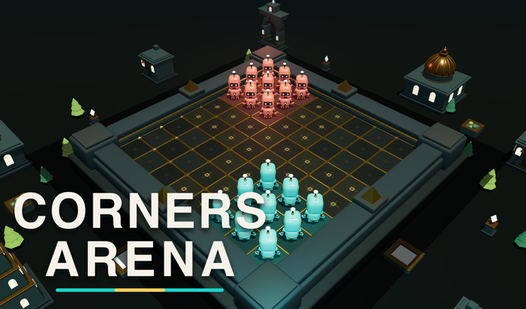
- Flexible Arena Sizes: Choose between 8x8, 10x10, or 12x12 boards. The size changes how much space you have to maneuver your pieces toward the goal.
- Movement Rule Variants: Switch between classic orthogonal movement and an eight-direction rule set. This alters the available paths for your pieces during the match.
- Customizable Interface: Adjust graphics, language, music, and effects settings. These options let you tune the look and feel of the board to your preference.
How to Play
Mastering Corners Arena movement
To learn how to play Corners Arena, select your piece and click a highlighted destination. You can choose a single step or pick the end of a jump chain. Planning your jump chains carefully allows you to cross the board quickly, so look for long, multi-jump routes before moving.
Corners Arena controls and view
Understanding Corners Arena controls helps you see the whole board. Drag to rotate your view and use the mouse wheel or a touch gesture to zoom in for a better look. Being able to change your perspective is vital when calculating complex jump chains across larger board sizes.
Who Should Play Corners Arena?
Frequently Asked Questions about Corners Arena
Can I play Corners Arena on my phone?
Yes, Corners Arena is supported on mobile devices. You can use touch gestures to zoom in on the board and interact with your pieces.
Does Corners Arena have multiplayer?
The game includes a local mode for two players. You and a friend can compete against each other on the same device during a match.
How do you win in Corners Arena?
The objective is to move every one of your pieces into the opposite corner of the board. The first player to successfully relocate all their pieces wins.
Is Corners Arena free to play?
Yes, Corners Arena is free to play on Nub Games. No download or registration required.
What age rating is Corners Arena?
The catalog age rating for Corners Arena is 6+.