
Tower of Hell Parkour Guide: How to Beat the Levels

In Tower of Hell Parkour, your goal is to climb through a chain of platforms and obstacles without unnecessary falls. The key to finishing is control rather than raw speed: align the camera, choose a landing point in advance, and jump only when your character is standing still. At a difficult section, study the route first and then handle one obstacle at a time.
What do you need to do in Tower of Hell Parkour?
Your objective is to climb from platform to platform until your character reaches the top of the tower.
Each section tests a different skill, such as jump accuracy, direction control, distance judgment, or stopping at the right moment. Do not watch only your character. Keep an eye on both the edge of your current platform and the next landing point. This makes it easier to judge when to start moving and when to release the movement key.
Before your first jump, inspect as much of the route as you can see. The closest platform may look like the obvious choice but leave you at an awkward angle for the next move. It is better to plan a chain of two or three safe positions. Once you land, do not rush. Release movement, regain full control of the character, and only then prepare the next jump.
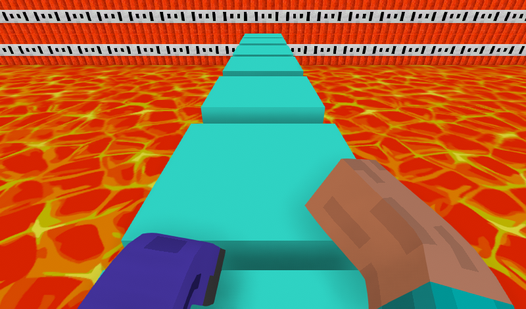
How do you play Tower of Hell on a laptop?
On a laptop, control movement and jumping with the keyboard while using your free hand to adjust the camera with a touchpad or mouse.
Check the control prompts inside the game before starting. Browser versions commonly use WASD or the arrow keys for movement and a separate key, often Space, for jumping. If more than one layout is supported, choose the one that lets you keep your fingers in place between jumps.
A touchpad is fine for calm sections, but it can make quick camera turns harder. Increase its sensitivity if one turn requires several swipes. If the camera regularly overshoots the angle you want, lower the sensitivity instead. A regular mouse is often more comfortable during long sequences of precise jumps because you can hold a direction and adjust the view smoothly at the same time.
Place the laptop on a stable surface. Playing with it balanced on your knees can tire your hands, and an accidental touch may turn the camera during a jump. Close demanding browser tabs if the image stutters. Even a short delay makes the landing moment harder to read and can make the controls feel inconsistent.
Avoid holding a movement key continuously. Use short taps on narrow platforms. You will move more slowly, but it becomes much easier to approach an edge and avoid walking off after landing.
How do you play Tower of Hell on PC?
On PC, set up a clear view first and split the controls between your hands: move with the keyboard and guide the camera with the mouse.
Position the camera so you can see the platform edge and the space above your character. A view that is too close hides the next foothold, while a very distant view makes foot placement harder to judge. Look for a middle distance where the character does not block the route but remains large enough to control accurately.
For a straight jump, the camera should face along the intended path. If it points sideways, you may press the wrong direction and drift past the platform. Before a difficult move, stop, aim the center of the screen at your landing point, and only then begin the approach.
If the browser scrolls the page when you press the jump key or captures the arrow keys, click inside the game window first. Fullscreen mode can also remove distracting page elements. If the frame rate is unstable, lower the graphics quality when that option is available. Smooth movement is more useful for parkour than extra visual effects.
How do you play step by step?
Climb through small, controlled actions instead of treating the entire tower as one uninterrupted sprint.
- Check the controls - confirm that movement, jumping, and camera input respond without noticeable delay.
- Inspect the route - identify the nearest safe platforms and the general direction of the climb.
- Align the camera - point the view along the path of the upcoming jump.
- Approach the edge - use short taps so you do not fall before you are ready.
- Choose a landing point - aim near the center of the platform instead of its far edge.
- Build only the required movement - avoid a long run-up when a controlled jump can cover the gap.
- Make the jump - hold the direction only as long as needed to reach the platform.
- Remove excess speed - release movement after contact so the character does not walk off.
- Restore your view - turn the camera toward the next obstacle before moving again.
- Repeat with a purpose - after a fall, correct one specific mistake instead of merely attempting the same jump faster.
How do you play Tower of Hell alone?
During a solo run, follow your own rhythm and treat every fall as information about the route you selected.
Without other players, you cannot copy their movements, but nobody blocks your view or pressures you to rush. At an unfamiliar section, stop on a wide platform and examine the obstacle layout. Look for the safest side from which to approach a narrow foothold and consider where the camera should face after landing.
Divide the climb into short segments. Your immediate goal is not the top of the tower but the next stable position. This approach is especially useful after several falls, when you may feel tempted to recover lost progress quickly. Rushing through a familiar lower section often causes another mistake before you even return to the hard part.
If an obstacle keeps defeating you, use one slow attempt for observation. Check whether you jump too early, whether the approach is long enough, and whether you keep holding movement after landing. Change only one variable per attempt. Otherwise, you will not know which adjustment produced a better result.
Training in similar parkour towers can also help. A different arrangement of platforms forces you to develop camera control and distance judgment instead of memorizing a single route.


How do you beat different levels and obstacles in Tower of Hell?
Each obstacle type needs a slightly different technique, but the main rule stays the same: choose a safe path first and then complete the movement without changing your decision halfway through.
Do not jump automatically on wide platforms. Walking may be safer and more accurate. On narrow beams, keep the camera aligned with the platform and move through short taps. The farther the camera points away from the path, the harder it is to notice a small sideways drift.
Before a long jump, judge both the distance and the amount of space available for your approach. Aim for the central part of the landing platform. Trying to catch its outer edge leaves almost no room to stop. If the destination is higher, make sure its edge does not hide your intended landing point. A small camera adjustment can provide a much clearer angle.
During a sequence of small platforms, avoid pressing jump again the instant you touch down. First confirm that the character is standing securely. If you keep holding the direction, momentum may carry you off the second platform even when the first jump was accurate.
For obstacles that require a turn, prepare the camera before jumping whenever possible. Turning sharply in midair adds another input and increases the chance of a mistake. If the path changes direction after landing, finish the jump, stop, and then rotate toward the next section.
Which techniques help you fall less often?
The most reliable techniques reduce unnecessary inputs and make the outcome of each jump easier to predict.
- I aim for the center rather than the edge of a platform. This gives me room for a slightly imperfect camera angle and enough space to stop after landing.
- Before a difficult jump, I release every key for a moment. This confirms that the character is stationary and prevents the next input from mixing with leftover movement.
- After falling, I name one cause: an early jump, excessive speed, a poor angle, or holding the direction for too long. On the next attempt, I correct only that issue.
- If I miss the same obstacle several times, I make one deliberately slow practice approach. Seeing the path and camera position clearly matters more than immediately returning to my previous height.
These habits may feel slow, but they save time by reducing repeated climbs. A consistent player often reaches higher than someone who moves faster but takes a risk on every platform.
Why does the character fall after a successful jump?
The character usually falls after touching the platform because movement is still being held, excess speed carries them forward, or the camera points in the wrong direction.
If you held a movement key in the air, release it as soon as you land. On a small platform, one extra step can be enough to fall. Do not try to stop, turn the camera, and begin another jump at the same time. Separate those actions.
Another common mistake is watching the upper tower instead of the nearest foothold. This makes the edge under your character difficult to see. You only need a general sense of the route before jumping. During the actual movement, focus on the intended landing point.
Do not repeat a failed attempt automatically. If the character keeps overshooting, shorten the approach or release the direction sooner. If you fall short, move closer to the edge and make sure you are jumping forward rather than diagonally. If every jump drifts sideways, fix the camera alignment first.
FAQ
How do you control the character on a laptop?
Use the movement and jump keys shown by the game, then turn the camera with a touchpad or mouse. Before a difficult section, make sure the cursor is focused inside the game window.
Can you beat Tower of Hell alone?
Yes. Solo play is useful for calm practice because other players cannot block the platforms, and you can choose your own pace.
Why can I not land on a narrow platform?
The likely causes are a poor camera angle, too much approach speed, or aiming for the edge. Align the view and target the center of the platform.
How can I learn difficult levels faster?
Break obstacles into individual movements, identify one specific reason for each fall, and change one part of your technique per attempt. Accuracy builds progress faster than constant rushing.