

















Key Features
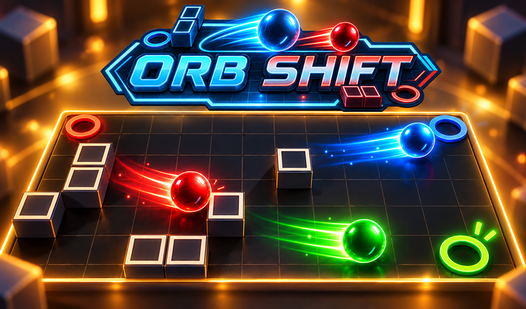
- Puzzle variations: Play Classic mode for pure movement puzzles or Challenges featuring magnetic brakes, one-way gates, and teleporters.
- Progression: Collect stars, unlock skins, and climb the overall leaderboard.
How to Play
Moving orbs
Swipe across the board to move all orbs simultaneously. On a computer, use the arrow keys or WASD keys.
Movement mechanics
Orbs stop when they hit a wall, an obstacle, or another orb. Use these elements as supports to position your orbs correctly.
Completing levels
Guide every orb to the goal of the same color. Use the Restart button to reset the layout if needed.
Improving score
Complete levels in as few moves as possible to earn more stars.
Who Should Play Orb Shift?
Frequently Asked Questions about Orb Shift
How do the orbs move?
Every orb moves at the same time in the direction you choose and stops only when hitting a wall, obstacle, or another orb.
How are stars earned?
Stars are earned based on your move count. The closer your solution is to the minimum number of moves, the more stars you receive.
Is Orb Shift free to play?
Yes, Orb Shift is free to play on Nub Games. No download or registration required.
Can I play Orb Shift on mobile?
Orb Shift works on both desktop and mobile devices. Best played in landscape mode.
What age rating is Orb Shift?
The catalog age rating for Orb Shift is 6+.