

















Key Features
- Procedural Puzzles: Each player receives a unique set of puzzles. This means you can keep solving fresh routes indefinitely.
- Automatic Saves: The game tracks your progress as you complete levels. You can return to your station at any time.
- Complex Optics: Color filters and splitters shift the light behavior. These tools add depth to the routing process.
How to Play
Laser Path: Rotating Mirrors
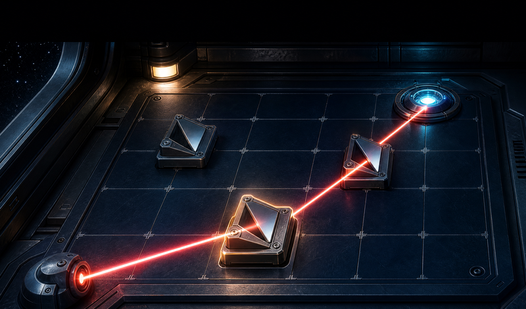
Tap or click the mirrors on your screen to rotate them into position. You must follow the laser path as it bounces off these surfaces to reach every beacon. Learning how to play Laser Path requires you to track the beam carefully, as a single off-center mirror will lead to a dead end.
Managing Laser Path Splitters
Advanced levels introduce color filters and beam splitters that change how the light moves. These elements divide the beam into multiple routes, forcing you to think about the entire board at once. If you mess up the configuration, select Restart to clear the mirrors and attempt the puzzle again.
Who Should Play Laser Path?
Frequently Asked Questions about Laser Path
Can I play Laser Path on my phone?
Yes, Laser Path is supported on mobile devices. You can use your touch screen to rotate mirrors and manage your beam routes just like on a desktop.
What are the Laser Path controls?
The Laser Path controls consist of tapping or clicking mirrors on the board to rotate them. Use the Select Level button to navigate between different puzzles.
Is Laser Path free to play?
Yes, Laser Path is free to play on Nub Games. No download or registration required.
What age rating is Laser Path?
The catalog age rating for Laser Path is 0+.