














Key Features
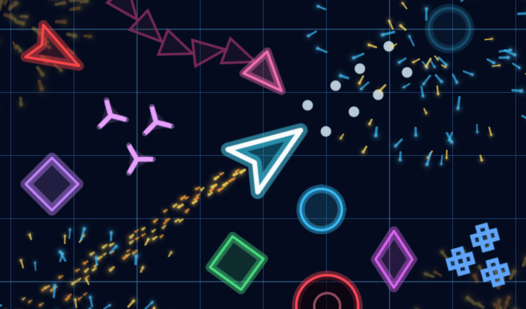
- Score Multiplier: Destroy the endless stream of enemies to increase your score multiplier.
- Power-ups: Collect weapons, earn extra lives, and restock bombs during gameplay.
- Dynamic Difficulty: The assault intensifies as your score grows, including hazards like black holes that pull in surrounding objects.
How to Play
Movement and Firing
On a computer, use WASD or arrow keys to move the ship and the cursor to aim. On a gamepad, use the left stick to move and the right stick to aim. On mobile, use the left virtual stick for movement and the right virtual stick for firing direction.
Weapon Controls
On a computer, use the right mouse button to toggle automatic fire. If automatic fire is disabled, use the left mouse button to fire manually.
Using Bombs
Clear a path using a bomb by pressing Space, Shift, or B on a keyboard. On a gamepad, use the B or LB buttons. On mobile devices, use the separate bomb button.
Game Management
Press the Gear icon or Escape on a keyboard to access settings and pause the game. On a gamepad, use the A button to start the game.
Who Should Play Geometry Battle?
Frequently Asked Questions about Geometry Battle
How do I deal with tight situations?
You can clear a path through the enemies by using a bomb.
Does the game get harder?
Yes, as your score grows, the enemy assault intensifies and black holes appear.
Is Geometry Battle free to play?
Yes, Geometry Battle is free to play on Nub Games. Optional in-app purchases are available. No download or registration required.
Can I play Geometry Battle on mobile?
Geometry Battle works on both desktop and mobile devices. Best played in landscape mode.
What age rating is Geometry Battle?
The catalog age rating for Geometry Battle is 6+.