



Key Features
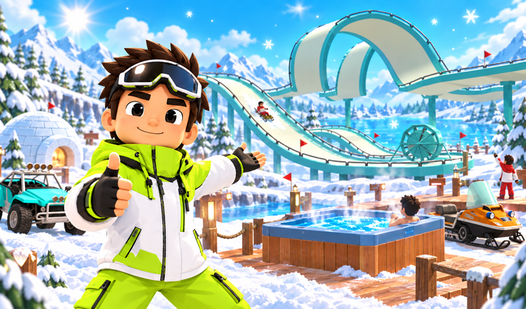
- Slide Customization: Assemble tracks using straights, banked turns, jumps, spirals, loops, and corkscrews.
- Resort Management: Upgrade individual income sources and expand your resort plot.
- Rebirth System: Reset progress to gain an income multiplier and a higher block limit.
- Neighbor Interaction: Visit neighboring properties to view their slide designs and ride their tracks.
How to Play
Controls
Use WASD or arrow keys to move, Space to jump, and E to interact. On mobile, use the on-screen joystick and buttons.
Constructing Slides
Buy track pieces in the shop and place blocks at the Build Hill stand to earn money. Press E at the Ride on the hill sign to collect income from every block on the track.
Additional Attractions
Summon a snowmobile to earn money based on your speed, or sit in the jacuzzi to earn a steady trickle of income.
Upgrading
Visit upgrade stands to improve your snowmobile and jacuzzi. Expand your plot and perform a rebirth to multiply your income and increase your block limit.
Who Should Play Build a Winter Resort?
Frequently Asked Questions about Build a Winter Resort
Can I upgrade my neighbor's slides?
No, you cannot upgrade someone else's property.
How do I collect income from my slide?
Press E at the Ride on the hill sign to perform a run that collects income from every block on the track.
What happens when I perform a rebirth?
Your income multiplier and block limit increase, allowing your resort to grow larger.
Is Build a Winter Resort free to play?
Yes, Build a Winter Resort is free to play on Nub Games. Optional in-app purchases are available. No download or registration required.
Can I play Build a Winter Resort on mobile?
Build a Winter Resort works on both desktop and mobile devices. Best played in landscape mode.
What age rating is Build a Winter Resort?
The catalog age rating for Build a Winter Resort is 6+.