







Key Features
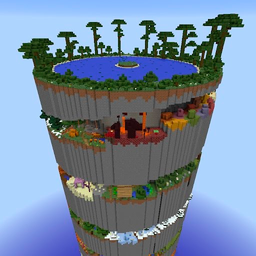
- Vertical gravity: The camera angle makes height feel real. You will look down and instantly regret it.
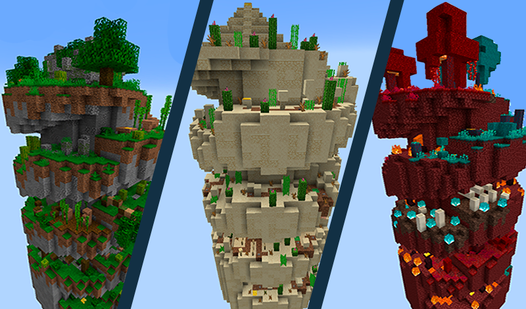
- Five biomes: Each zone changes the visual theme. Desert heat and Taiga ice offer unique distractions while you climb.
- Portal finish: Reaching the summit is the only goal here. It provides a clean end to each run.
- Stiff movement: The character feels a bit floaty. You have to compensate for the weightless jump physics.
How to Play
Spiral parkour: The basics
Use WASD or your joystick to move. Spiral parkour controls are standard, but the jumping requires timing. You need to learn how to play Spiral parkour by watching your shadow to gauge distance. Most newcomers jump too early and miss the ledge entirely, so keep your eyes on the platform edge.
Scaling the Spiral parkour tower
Focus on the path ahead. Each level forces you to climb higher until the portal appears. Speedrunning these is tempting, but a single slip sends you back to the start. The later worlds have tighter gaps that demand perfect timing. Don't blink or you'll be starting over from the bottom.
Who Should Play Spiral parkour?
Frequently Asked Questions about Spiral parkour
How many levels does Spiral parkour have?
The game includes five distinct levels including Desert, Mountains, Hell, Jungle, and Taiga. Each one increases in difficulty as you ascend toward the final portal.
Can I play Spiral parkour on my phone?
Yes, it works on mobile devices using your thumbstick. You get the same experience as the desktop version, though smaller screens make the precise jumps tougher.
Is Spiral parkour free to play?
Yes, Spiral parkour is completely free to play on Nub Games. There are no in-app purchases. No download or registration required.
Can I play Spiral parkour on mobile?
Spiral parkour works on both desktop and mobile devices. Best played in landscape mode.
What age rating is Spiral parkour?
The catalog age rating for Spiral parkour is 0+.