






Key Features
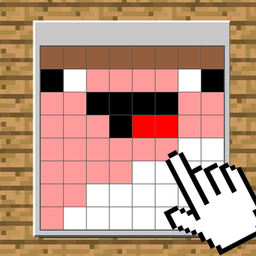
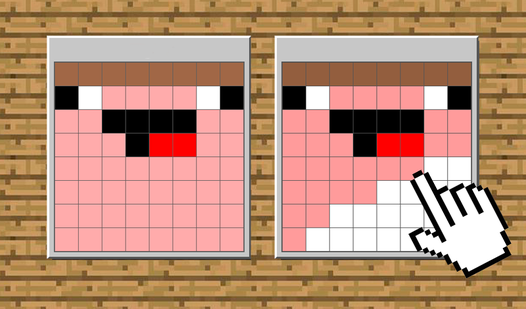
- Blocky Character Roster: You get to recreate familiar faces from the block world. Seeing Steve come together square by square is weirdly satisfying.
- Custom Canvas Editor: Once you finish the main levels, jump into the editor. You can build your own pixel art from scratch here.
- Coloring Precision: The game demands focus. If your hand slips on a tiny screen, you will have to fix your mistake.
- Visual Pattern Training: It helps you track small details. You will get faster at spotting color differences the more you play.
How to Play
Pixel Craft: Repeat the Drawing: Mastering the Basics
First, select your color from the palette on the right side of the screen. You can use your mouse or tap the screen to fill in the grid. Learning how to play Pixel Craft: Repeat the Drawing is straightforward, but do not click too fast. You will accidentally paint the wrong block and ruin your pattern.
Pixel Craft: Repeat the Drawing: Using the Tools
When you need to look at the Pixel Craft: Repeat the Drawing controls, remember that dragging your finger or mouse is way faster than clicking every individual cell. Use the reset button if you get stuck. Just watch out for the later levels, because the patterns get complex and the colors start to look nearly identical.
Who Should Play Pixel Craft: Repeat the Drawing?
Frequently Asked Questions about Pixel Craft: Repeat the Drawing
Can I play Pixel Craft: Repeat the Drawing on my phone?
Yes, it works perfectly on mobile devices. You just tap the colors and swipe across the grid to paint your masterpiece on the go.
How do you fix a mistake in Pixel Craft: Repeat the Drawing?
If you color a square wrong, just select the correct color and paint over it. The game lets you overwrite any cell instantly if you mess up.
Is Pixel Craft: Repeat the Drawing free to play?
Yes, Pixel Craft: Repeat the Drawing is completely free to play on Nub Games. Optional in-app purchases are available. No download or registration required.
Can I play Pixel Craft: Repeat the Drawing on mobile?
Pixel Craft: Repeat the Drawing works on both desktop and mobile devices. Best played in landscape mode.
What age rating is Pixel Craft: Repeat the Drawing?
Pixel Craft: Repeat the Drawing has a content rating of 6++. It is suitable for all ages.