









Key Features
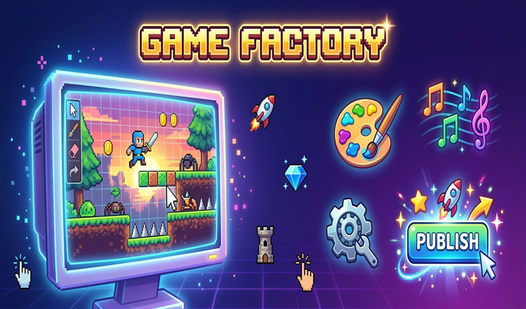
- Pixel Sprite Editor: Draw every character and obstacle from scratch. The grid is small, so keep your designs minimalist or they look like blurry messes.
- Genre Sandbox: Switch between six different game types. The physics engine changes drastically, so adjust your level design to match the new speed.
- Studio Progression: Earn currency by publishing. Buying new sprite packs gives you more variety for your future projects.
- Level Sharing: Send your custom code to friends. They can jump into your creation instantly to see if your level is actually beatable.
How to Play
Game Factory: Getting started
Hit the create button to pick a genre. You navigate the Game Factory controls using your mouse to drag elements onto the canvas. Don't stress about the initial settings too much. You can always dial back the enemy speed later if you mess up the difficulty balance.
Painting inside Game Factory
Select the drawing tab to customize your sprites. You will find that pixel art is tricky at first because those tiny squares are unforgiving. Focus on simple shapes before you try anything fancy. Knowing how to play Game Factory means mastering the brush tool to keep your hitboxes tight.
Testing your Game Factory creation
Click the test button to jump into your own level. It is the only way to see if your gravity settings are a total nightmare. If your character falls through the floor, just head back to the editor. Publishing your work earns you coins to unlock more items for your studio.
Who Should Play Game Factory?
Frequently Asked Questions about Game Factory
Can I play Game Factory on my phone?
Yes, you can run this in your mobile browser. The interface stays clean, though drawing tiny pixel sprites with your thumb might require a bit of patience.
How do you share levels in Game Factory?
Once you finish your creation and hit publish, the game generates a unique code. Send this string to your friends so they can load your level.
Is Game Factory free to play?
Yes, Game Factory is completely free to play on Nub Games. There are no in-app purchases. No download or registration required.
Can I play Game Factory on mobile?
Game Factory works on both desktop and mobile devices. Best played in portrait mode.
What age rating is Game Factory?
The catalog age rating for Game Factory is 6+.