





Key Features
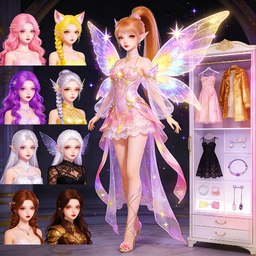
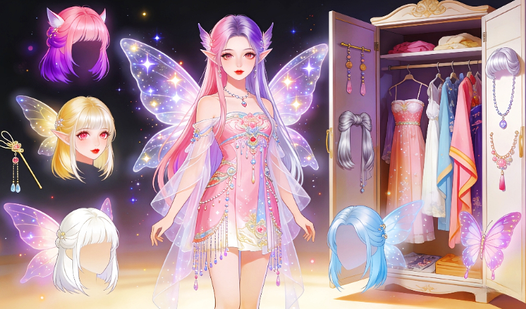
- Infinite color palettes: Tweak individual shades for every piece of clothing. You aren't stuck with pre-set colors anymore.
- Randomized fairy generator: Stuck in a creative rut? Click the dice to instantly generate a completely wild character.
- Photo mode layouts: Select from various frames and backgrounds to make your character pop. It makes sharing your best work much easier.
- Save and export: Download your creations to keep them forever. Show your friends exactly what you built.
How to Play
DreamFae: Basic creation
Use your mouse or tap to navigate the DreamFae controls. Click through the categories on the right to swap out hairstyles, wings, and outfits. Don’t rush the process, or you’ll miss the tiny color-picker icon that lets you customize every single shade.
Mastering DreamFae: Pro tips
If you struggle to find a look, hit the dice button on the left to randomize everything. It’s a great way to stumble onto combos you’d never pick yourself. Just remember that once you hit randomize, your current progress is gone. That is how to play DreamFae like a pro.
Who Should Play DreamFae?
Frequently Asked Questions about DreamFae
Can I play DreamFae on my phone?
Yes, you can run this right in your mobile web browser. It is fully responsive, though you might need to zoom in if your fingers are too big for the menus.
How do you save your character in DreamFae?
Use the built-in photo button to snap a shot of your creation. It saves the file directly to your device so you can share your favorite fairy designs anywhere.
Is DreamFae free to play?
Yes, DreamFae is completely free to play on Nub Games. There are no in-app purchases. No download or registration required.
Can I play DreamFae on mobile?
DreamFae works on both desktop and mobile devices. Best played in landscape mode.
What age rating is DreamFae?
The catalog age rating for DreamFae is 12+.