







Key Features
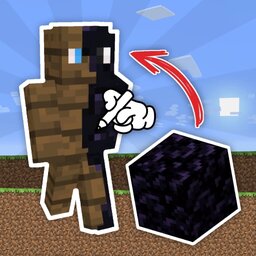
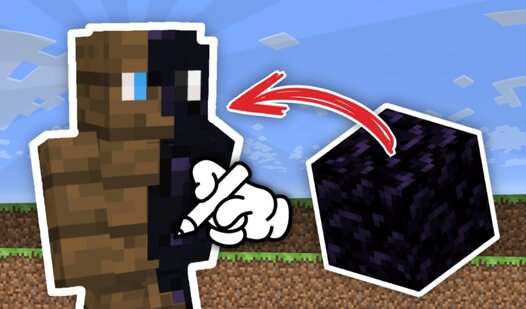
- Pixel Placement: Every single block you drop counts toward your final score. Placing them carefully helps you climb the leaderboard faster.
- Camera Control: Zoom in to fix tiny mistakes on the face. The sliders let you reposition the view so your lines stay clean.
- Transparent Eraser: Mistakes are inevitable. Just swap to the transparent block to wipe away any stray pixels without ruining your whole design.
- Canvas Reload: Starting over is easy. Just hit the reload button if your current attempt looks like a total mess.
How to Play
How to play Create a skin from blocks in Mine without stress
Mastering the Create a skin from blocks in Mine controls is simple. Use your mouse to pick blocks and click the canvas to place them. Remember that you can swap to a transparent block if you mess up a line. Most people forget to use the zoom sliders early on, which makes detailed work a nightmare.
Create a skin from blocks in Mine: Tips for the leaderboard
Filling every pixel earns you points to climb the rankings. If you want to be the best, you have to stay patient with the edges of the character model. It’s a bit annoying how the camera sometimes refuses to rotate exactly where you want it. Keep practicing until your skin design looks professional.
Who Should Play Create a skin from blocks in Mine?
Frequently Asked Questions about Create a skin from blocks in Mine
Can I play Create a skin from blocks in Mine on my phone?
Yes, it works on mobile browsers just as well as on desktop. You can tap the screen to place blocks exactly where you need them.
What are the controls for Create a skin from blocks in Mine?
You use your mouse or touch screen to select blocks and paint the canvas. There aren't any complex keyboard shortcuts to memorize while you build your character.
Is Create a skin from blocks in Mine free to play?
Yes, Create a skin from blocks in Mine is completely free to play on Nub Games. There are no in-app purchases. No download or registration required.
Can I play Create a skin from blocks in Mine on mobile?
Create a skin from blocks in Mine works on both desktop and mobile devices. Best played in landscape mode.
What age rating is Create a skin from blocks in Mine?
The catalog age rating for Create a skin from blocks in Mine is 0+.