











Key Features
- Burnout management: The customers become total nightmares if you leave them waiting. Keeping them happy forces you to prioritize tasks under extreme pressure.
- Upgrade paths: Buying better tools changes your speed. You will notice the difference in your throughput within seconds of clicking purchase.
- Kitchen layouts: Each restaurant location forces you to rethink your movement. You cannot use the same pattern twice.
- Visual chaos: The screen fills up with orders quickly. It keeps your eyes moving constantly.
How to Play
Cooking Dash: Getting Started
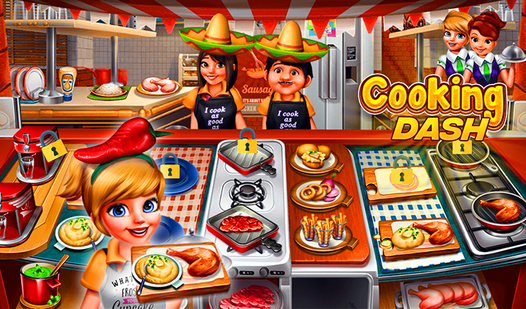
Mastering the Cooking Dash controls takes a minute because you use your mouse to click on tools and ingredients. You need to prep items first, then tap the plates once they are finished. Most people forget to clear the dirty dishes, which is a common mistake that blocks your prep area entirely.
Why upgrade in Cooking Dash?
Once you learn how to play Cooking Dash, you will notice the customers get impatient fast. Spend your coins on faster stoves and better prep stations immediately. If you ignore these upgrades, you will never keep up with the later shifts. The difficulty spikes hard once you reach the ice cream levels.
Who Should Play Cooking Dash?
Frequently Asked Questions about Cooking Dash
Can I play Cooking Dash on my phone?
Yes, you can access the game on mobile devices through your browser. Just make sure your screen is large enough to hit those tiny ingredient icons.
How do you upgrade tools in Cooking Dash?
Open the shop menu between levels to spend your earned coins. Focus on the stoves first so you can cook more items at once.
Is Cooking Dash free to play?
Yes, Cooking Dash is completely free to play on Nub Games. There are no in-app purchases. No download or registration required.
Can I play Cooking Dash on mobile?
Cooking Dash works on both desktop and mobile devices. Best played in landscape mode.
What age rating is Cooking Dash?
The catalog age rating for Cooking Dash is 6+.