












Key Features
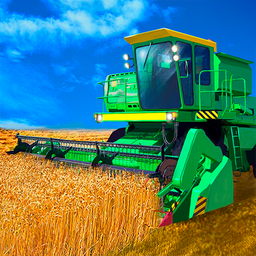
- Heavyweight physics: The machine feels sluggish and massive. You have to account for the momentum before every turn.
- Field expansion: Maps grow in size as you progress. You will definitely miss the simplicity of the starting area.
- Trailer docking: Unloading requires precision. You have to align perfectly or you waste precious time.
- Slippery handling: The steering feels a bit loose on dirt. It makes navigating the edges of the map annoying.
How to Play
Mastering Combine Simulator controls
Use WASD for movement and Space to brake. It’s basic, but the weight of the machine makes it tricky. You need to know how to play Combine Simulator with a steady hand because the turning radius is massive. If you try to whip it around like a sports car, you’ll just slide off the field.
The Combine Simulator harvest loop
Drive over the wheat to collect it, then find your trailer to unload. The common mistake is ignoring your capacity bar until it’s too late. Once you hit the later stages, the maps get huge and the paths become a nightmare to memorize. Prepare to spend way more time reversing than you expected.
Who Should Play Combine Simulator?
Frequently Asked Questions about Combine Simulator
Can I play Combine Simulator on my phone?
Yes, you can play this on mobile devices. The touch controls work fine, though the screen space feels a bit cramped for such a large harvester.
What are the controls for Combine Simulator?
Use the WASD keys to steer your harvester across the field. Tap the spacebar to engage the brakes when you arrive at the unloading station.
Is Combine Simulator free to play?
Yes, Combine Simulator is completely free to play on Nub Games. There are no in-app purchases. No download or registration required.
Can I play Combine Simulator on mobile?
Combine Simulator works on both desktop and mobile devices. Best played in landscape mode.
What age rating is Combine Simulator?
The catalog age rating for Combine Simulator is 6+.