












Key Features
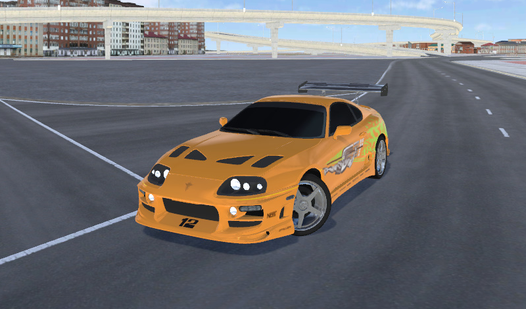
- Realistic deformation: The bodywork reacts to every impact. You can study exactly how the car frame bends during a high speed wreck.
- Unique [3d](/tag/3d) maps: Choose between city tracks and drift serpentines. Every location offers a different way to test your driving limits.
- Camera options: Press C to cycle through viewing angles. This helps you track the damage from different perspectives.
How to Play
Mastering AutoNG.Destroy movement
Use WASD to navigate your vehicle across the test grounds. Press the Spacebar to engage the handbrake when you need to stop or initiate a sharp turn. Learning how to play AutoNG.Destroy effectively requires you to manage these AutoNG.Destroy controls so you can hit obstacles at the right angle.
Using turbo in AutoNG.Destroy
Tap the V key to activate your turbo boost. This provides the speed necessary to reach the dangerous downhill roads or jump over gaps. Be careful because higher speeds result in more intense deformation when you finally collide with the environment during your AutoNG.Destroy crash test session.
Who Should Play AutoNG.Destroy?
Frequently Asked Questions about AutoNG.Destroy
What are the PC controls for AutoNG.Destroy?
You drive using WASD, use the Spacebar for the handbrake, and hit V for turbo. You can also change the camera perspective with C or open the menu using Tab.
Can I play AutoNG.Destroy on my phone?
Yes, the game is supported on mobile devices. You simply use the on-screen buttons and interface controls provided in the game layout to drive and crash.
Is AutoNG.Destroy free to play?
Yes, AutoNG.Destroy is completely free to play on Nub Games. There are no in-app purchases. No download or registration required.
Can I play AutoNG.Destroy on mobile?
AutoNG.Destroy works on both desktop and mobile devices. Best played in landscape mode.
What age rating is AutoNG.Destroy?
The catalog age rating for AutoNG.Destroy is 6+.