









Key Features
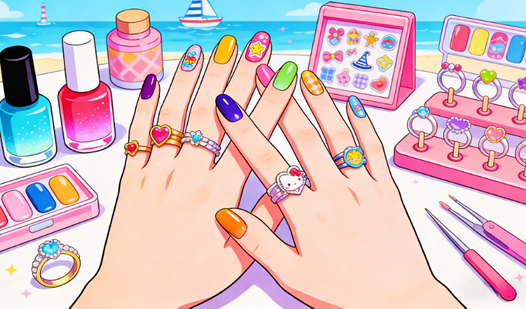
- Layered Artistry: Stickers sit on top of your polish. You can hide little mistakes by placing a jewel right over a crooked line.
- Dynamic Shapes: Changing the length forces you to rethink your entire color strategy. Longer tips demand bolder, high-contrast gradients.
- Ring Accents: You finish every look with a ring. It changes the vibe of the whole hand instantly.
- Gallery Ready: Take a snapshot of your work. It feels good to see your best designs saved in one place.
How to Play
Mastering Atelier Storie inputs
To learn how to play Atelier Storie, just use your mouse or finger to select a polish from the tray. Atelier Storie controls are simple: click or tap to pick your tool, then hold and drag to apply. Don't rush your strokes or you'll end up with messy edges.
Styling in Atelier Storie
Once the base color is set, click the sticker menu to add some flair. You can layer these to create complex patterns, but keep an eye on the nail shape. If you pick a short, wide nail, there is almost no room for the intricate decals. Plan your layout before you commit.
Who Should Play Atelier Storie?
Frequently Asked Questions about Atelier Storie
How do you apply stickers in Atelier Storie?
Select the sticker icon from the menu, then drag it directly onto the nail surface. You can reposition it until you tap away to confirm the placement.
Can I play Atelier Storie on my phone?
Yes, it works perfectly on mobile devices. The touchscreen controls make it much easier to paint precisely than using a mouse on a large monitor.
Is Atelier Storie free to play?
Yes, Atelier Storie is completely free to play on Nub Games. There are no in-app purchases. No download or registration required.
Can I play Atelier Storie on mobile?
Atelier Storie works on both desktop and mobile devices. Best played in portrait mode.
What age rating is Atelier Storie?
The catalog age rating for Atelier Storie is 6+.