



Key Features
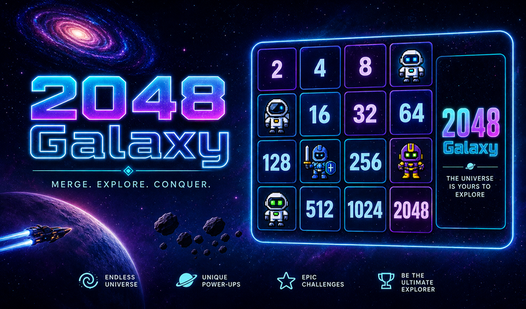
- Neon space interface: The visual style uses a neon aesthetic set against a deep space background. This changes the look of the board from standard numbers.
- Versatile control schemes: Use arrow keys on your PC or simple finger swipes on your mobile device. These 2048 Galaxy controls ensure you shift tiles in any direction.
- Useful undo system: Made a move you regret? Roll back your last action to save your space fleet.
- Language support: The game provides full support for both English and Russian languages.
How to Play
How to play 2048 Galaxy
To learn how to play 2048 Galaxy, use the arrow keys on your desktop or swipe on your mobile screen. When two identical tiles collide, they transform into a higher rank. Start with a Cadet and progress toward the Cosmic Legend. Keep the board from filling up to avoid failing the mission.
Fixing mistakes in 2048 Galaxy
If you move a tile into a bad position, use the undo system. This feature allows you to roll the game back a single step. Use it sparingly when you miscalculate a merge. It prevents the board from becoming a total mess before you reach the 2048 tile.
Who Should Play 2048 Galaxy?
Frequently Asked Questions about 2048 Galaxy
Can I play 2048 Galaxy on my phone?
Yes, this game supports mobile devices. You simply swipe your finger across the screen to shift your space fighters in the desired direction.
What are the 2048 Galaxy controls for PC?
On a desktop computer, you use the arrow keys on your keyboard. Pressing up, down, left, or right shifts all tiles on the board simultaneously.
How do I win at 2048 Galaxy?
The goal is to collect the 2048 tile, known as the Cosmic Legend. The game continues even after you reach this point if you want to keep playing.
Is 2048 Galaxy free to play?
Yes, 2048 Galaxy is free to play on Nub Games. No download or registration required.
What age rating is 2048 Galaxy?
The catalog age rating for 2048 Galaxy is 0+.