










Key Features
- Armor Customization: Swap out your gear to survive longer barrages. Better plating keeps you alive when bosses start spamming their heaviest shells.
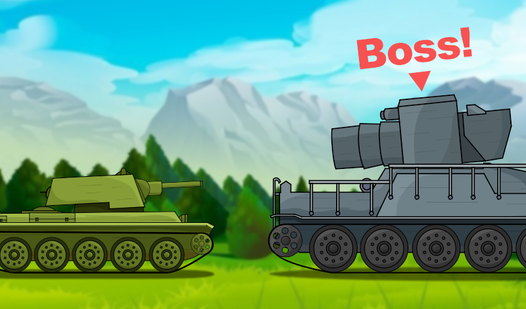
- Boss Encounters: These fights are a massive step up from regular enemies. You need to memorize their attack patterns or get vaporized.
- Arcade Chaos: The screen fills up fast. It turns into a bullet hell if you aren't careful.
- Upgrade Loops: Spend your winnings on faster cannons. It makes clearing early waves much faster.
How to Play
Tanks 2D: Battle!: Mastering Movement
To learn how to play Tanks 2D: Battle!, start by getting a feel for the movement. Use the WASD or arrow keys to dodge incoming fire on PC, or just tap those mobile buttons. You’ll slide around a bit too much at first, which makes aiming a nightmare until you adjust.
Tanks 2D: Battle! controls and repairs
Keep your eyes on the Tanks 2D: Battle! controls. Press R to repair your hunk of metal when things get heated. Most players forget they have a repair button until they are down to their last sliver of health. Don't be that guy. Use it before the boss shreds your armor.
Who Should Play Tanks 2D: Battle!?
Frequently Asked Questions about Tanks 2D: Battle!
How do you repair your tank in Tanks 2D: Battle!?
Just hit the R key while you're playing on a desktop. It’s the easiest way to stay in the fight when your health bar starts blinking red.
Can I play Tanks 2D: Battle! on my phone?
Yes, it works fine on mobile devices. You just use the touch buttons on your screen instead of a keyboard to navigate the map.
Is Tanks 2D: Battle! free to play?
Yes, Tanks 2D: Battle! is completely free to play on Nub Games. Optional in-app purchases are available. No download or registration required.
Can I play Tanks 2D: Battle! on mobile?
Tanks 2D: Battle! works on both desktop and mobile devices. Best played in landscape mode.
What age rating is Tanks 2D: Battle!?
Tanks 2D: Battle! has a content rating of 6++. It is suitable for all ages.