











Key Features
- Momentum physics: Speed isn't just a number here. The faster you move, the further you vault, making every landing a high-stakes calculation.
- Style points: Flip and vault over obstacles to show off. It’s mostly for looks, but who doesn't want to show up the competition?
- Daily grind: New challenges pop up every day. They force you to run routes you’d usually avoid just to earn those fancy accessories.
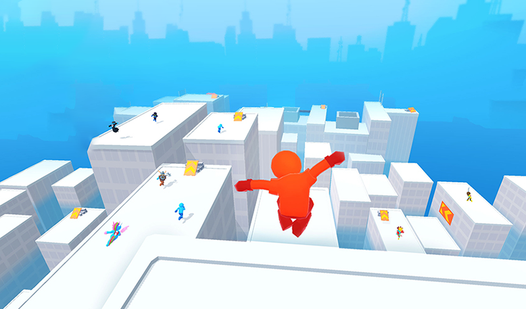
- Crowded tracks: You aren't running alone. The other stickmen clutter the screen, making it easy to lose focus during a tight jump.
How to Play
Mastering Parkour GO controls
Use A, D, or the arrow keys to sprint and steer your stickman. For mobile, just slide your finger across the screen. Understanding Parkour GO controls is the only way to avoid plummeting off the map. Most beginners mess up by trying to jump too early, which just ruins your momentum.
Why Parkour GO speed bumpers matter
Hit those glowing speed strips whenever you see them. They launch you forward and make clearing those massive rooftop gaps much easier. Learning how to play Parkour GO involves recognizing these boosts early. If you miss even one, you’ll likely fall behind the pack and lose your shot at the leaderboard.
Who Should Play Parkour GO?
Frequently Asked Questions about Parkour GO
Can I play Parkour GO on my phone?
Yes, it works on mobile browsers. Just use your touch screen to slide left or right and you'll be racing in seconds.
How do you hit speed boosts in Parkour GO?
You just run over the glowing bumpers scattered across the rooftops. They act as launch pads, so make sure you line up your jump perfectly.
Is Parkour GO free to play?
Yes, Parkour GO is completely free to play on Nub Games. There are no in-app purchases. No download or registration required.
Can I play Parkour GO on mobile?
Parkour GO works on both desktop and mobile devices. Best played in portrait mode.
What age rating is Parkour GO?
The catalog age rating for Parkour GO is 6+.