









Key Features
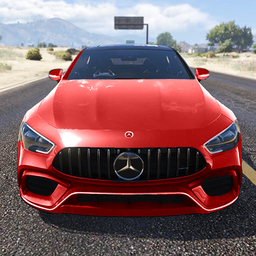
- Violent deformation: Parts fly off exactly where you hit. Your car gets smaller with every collision.
- Catapult launching: Hit the start button to send your vehicle flying. It makes timing your crashes much easier.
- Camera variety: Switch angles to track the wreckage. You can watch your bumper fly off in slow motion.
- Physics focus: The engine calculates weight and velocity on the fly. Heavy trucks hit differently than light cars.
How to Play
Lux Crashing Cars: Mastering the movement
To start your carnage, use WASD or your arrows to steer. Hit F to floor it before you launch the car off a ramp. If you're wondering how to play Lux Crashing Cars, just focus on speed and hitting the objects head-on. Don't worry about the paint job.
Lux Crashing Cars: Using the gear
Your Lux Crashing Cars controls include the spacebar for a quick handbrake turn, which helps you line up your impact trajectory. Use the C key to toggle camera views so you can see the damage from every angle. Just watch out for the steering, as it feels a bit slippery at high speeds.
Who Should Play Lux Crashing Cars?
Frequently Asked Questions about Lux Crashing Cars
How do you trigger the catapult in Lux Crashing Cars?
Simply click the Start button on your screen to activate the catapult. It launches your car directly into the obstacle course, saving you the trouble of driving slowly.
Can I play Lux Crashing Cars on my phone?
Yes, the game is fully optimized for mobile devices. You can wreck cars on the go just as easily as you would on your desktop.
Is Lux Crashing Cars free to play?
Yes, Lux Crashing Cars is completely free to play on Nub Games. Optional in-app purchases are available. No download or registration required.
Can I play Lux Crashing Cars on mobile?
Lux Crashing Cars works on both desktop and mobile devices. Best played in landscape mode.
What age rating is Lux Crashing Cars?
The catalog age rating for Lux Crashing Cars is 12+.