










Key Features
- Visual chaos: The screen gets packed with overlapping sprites. You have to filter out the noise to spot your target.
- Tight hitboxes: Dragging a fish requires a steady hand. If you’re off by a few pixels, the game won’t register your catch.
- Speed scaling: Targets zip past faster as you rack up points. It turns into a blur of colors quickly.
- Two modes: Choose between casual practice or the leaderboard climb. One is for relaxing, the other is for proving your skill.
How to Play
Learn how to play Find the Fish
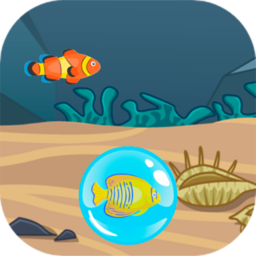
To start, check the bubble at the bottom. That shows your target. Use your mouse or finger to drag the matching fish into that circle. Find the Fish controls are simple, but don’t rush. A common mistake is grabbing the wrong fish because you moved too fast and panicked.
Mastering Find the Fish competitive mode
Competitive mode tracks your speed and accuracy. You need to keep your streak alive to climb the leaderboard. If you miss a target, your multiplier resets. It gets chaotic when the screen fills up with decoys. Keep your cool once the pace accelerates, or you’ll lose your progress.
Who Should Play Find the Fish?
Frequently Asked Questions about Find the Fish
Can I play Find the Fish on my phone?
Yes, you can play this on any mobile device with a touch screen. The drag-and-drop mechanics work well on phones, though the smaller screen makes the later levels much harder.
What are the controls for Find the Fish?
You use your left mouse button on a desktop or simply drag your finger across the glass on mobile devices. Just hold and slide the correct fish into the bubble.
Is Find the Fish free to play?
Yes, Find the Fish is completely free to play on Nub Games. There are no in-app purchases. No download or registration required.
Can I play Find the Fish on mobile?
Find the Fish works on both desktop and mobile devices. Best played in landscape mode.
What age rating is Find the Fish?
The catalog age rating for Find the Fish is 0+.