



Key Features
- Scaling economy: Upgrading your income is the only way to survive the mid-game. You have to balance expansion against your bank account.
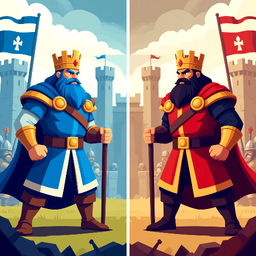
- Aggressive AI: The computer kingdoms don't wait for your turn. They will hit your weak spots the second you look away.
- Global leaderboards: Your wins count toward the ranking. Everyone is fighting for the top spot.
- Skill trees: You can customize your kingdom's bonuses. Pick skills that fit your preferred aggression level.
How to Play
Battle of the Kingdoms: Managing your supply
Use the slider at the bottom of the screen to choose your troop deployment. You click a cell and then the sword icon to initiate an attack. Battle of the Kingdoms controls are simple, but don't dump all your resources into one cell early. You'll leave your home base wide open.
How to play Battle of the Kingdoms efficiently
You must prioritize upgrading your resource gains in the menu on the right. If you ignore the economy, you won't have enough muscle to expand. Learning how to play Battle of the Kingdoms takes a few rounds. Expect to lose your first few matches while you figure out the timing.
Who Should Play Battle of the Kingdoms?
Frequently Asked Questions about Battle of the Kingdoms
Can I play Battle of the Kingdoms on my phone?
Yes, you can. It runs well on mobile browsers, so you can keep expanding your empire while you're away from your desktop.
How do you win a match in Battle of the Kingdoms?
You win by conquering every cell on the map. You have to eliminate every other kingdom, which is harder than it looks once the map fills up.
Is Battle of the Kingdoms free to play?
Yes, Battle of the Kingdoms is completely free to play on Nub Games. There are no in-app purchases. No download or registration required.
Can I play Battle of the Kingdoms on mobile?
Battle of the Kingdoms works on both desktop and mobile devices. Best played in landscape mode.
What age rating is Battle of the Kingdoms?
Battle of the Kingdoms has a content rating of 6++. It is suitable for all ages.