











Key Features
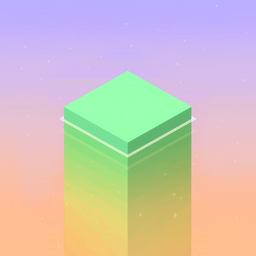
- Weighty physics: Blocks sway slightly as they land. You have to wait for the wobble to stop before placing the next one.
- Minimalist aesthetic: The clean lines help you focus on the edges. It keeps the visual noise low during intense runs.
- Rhythmic flow: The audio cues match the swinging blocks. It helps your brain sync up with the movement.
- Scaling difficulty: The blocks move faster as the tower grows. You will eventually hit a wall where precision becomes a nightmare.
How to Play
Master the Stack It Up! tap
Your goal is to drop blocks precisely on top of one another. Use your finger or a mouse click to stop the moving piece. The Stack It Up! controls feel a bit floaty at first, so you must account for a tiny delay before the block actually lands.
How to play Stack It Up! without crashing
Watch the edges of the block already on the tower. If you miss the alignment, the overhanging part gets sliced off. A common mistake is clicking too fast when the platform moves quickly. Take a breath. If you keep the tower centered, you will reach higher scores.
Who Should Play Stack It Up!?
Frequently Asked Questions about Stack It Up!
Can I play Stack It Up! on my phone?
Yes, you can play on any mobile device using your touchscreen. It works directly in your mobile browser, so you do not need to install an app.
What are the controls for Stack It Up!?
You just need to tap your screen or click the left mouse button. Timing that single input is the entire game, though the physics make it challenging.
Is Stack It Up! free to play?
Yes, Stack It Up! is completely free to play on Nub Games. There are no in-app purchases. No download or registration required.
Can I play Stack It Up! on mobile?
Stack It Up! works on both desktop and mobile devices. Best played in portrait mode.
What age rating is Stack It Up!?
The catalog age rating for Stack It Up! is 0+.