









Key Features
- Creative Mixing: Combine textures and pigments to match specific customer moods. Get the look right to earn a massive tip.
- Store Expansion: Unlock new shelves and display cases as your reputation grows. It makes your shop look legit.
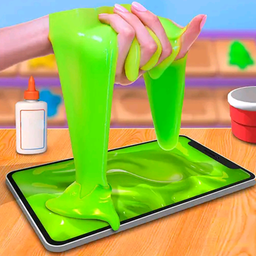
- Visual Feedback: Watch the slime jiggle and react to your mouse movements. It feels weirdly satisfying.
- Progressive Orders: Later customers start asking for layered creations that require real focus. You have to be precise.
How to Play
Mastering Slime Shop mechanics
To learn how to play Slime Shop, just tap or click the screen to pour your ingredients. Slime Shop controls rely on a simple pinch-and-drag motion to fill the containers. Avoid overfilling the jars. You will lose cash if your presentation looks like a total disaster.
Upgrading your Slime Shop store
Spend your hard-earned coins on fresh ingredients to keep the crowd happy. Higher tier items let you tackle complex requests for more profit. Be warned, the touch detection gets a bit finicky when you try to move too quickly. Slow down your clicks to maintain accuracy.
Who Should Play Slime Shop?
Frequently Asked Questions about Slime Shop
Can I play Slime Shop on my phone?
Yes, you can play on any mobile device by using your touchscreen. The interface works great on small screens, so you can run your business anywhere.
What are the controls for Slime Shop?
You use your mouse or finger to tap, hold, and pour the slime. Simply drag your pointer over the container to fill it up to the requested line.
Is Slime Shop free to play?
Yes, Slime Shop is completely free to play on Nub Games. There are no in-app purchases. No download or registration required.
Can I play Slime Shop on mobile?
Slime Shop works on both desktop and mobile devices. Best played in portrait mode.
What age rating is Slime Shop?
The catalog age rating for Slime Shop is 6+.