Key Features
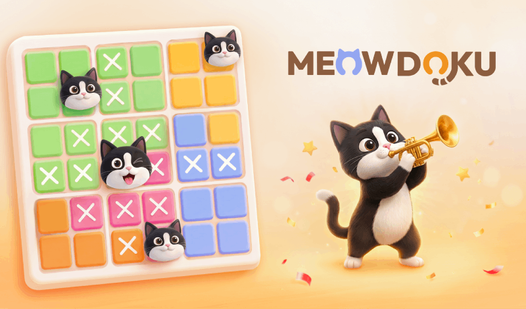
- Strict spacing: Cats refuse to sit near each other. You must account for that diagonal buffer or the board stays locked.
- Color zones: Regions force you to rethink standard grid logic. They restrict placement options in ways rows never do.
- Clean UI: The interface stays out of your way. You only see the grid and the kittens.
- Logic flow: Every placement triggers a chain reaction. You find one safe spot and the rest falls into place.
How to Play
Meowdoku: The basics
Tap cells to place a cat or leave them empty. You must ensure every row, column, and color region holds exactly one feline. Meowdoku controls are simple taps, but don't get cocky. One common mistake is forgetting that cats cannot touch, even diagonally. That is how to play Meowdoku without losing your mind.
Mastering Meowdoku logic
Scan the regions with fewer open spaces first. Eliminate invalid spots before you commit to a placement. If you guess, you will ruin the whole board. Later levels introduce tight corners that feel kind of unfair when you run out of moves, so keep your options open.
Who Should Play Meowdoku?
Frequently Asked Questions about Meowdoku
Can I play Meowdoku on my phone?
Yes, it runs in your mobile browser. The grid scales well, so you can solve puzzles during a commute without squinting at tiny kittens.
How do you win in Meowdoku?
You win by filling every region, row, and column with exactly one cat. You must also ensure no cats touch each other, which is the real challenge.
Is Meowdoku free to play?
Yes, Meowdoku is completely free to play on Nub Games. There are no in-app purchases. No download or registration required.
Can I play Meowdoku on mobile?
Meowdoku works on both desktop and mobile devices. Best played in portrait mode.
What age rating is Meowdoku?
The catalog age rating for Meowdoku is 0+.