











Key Features
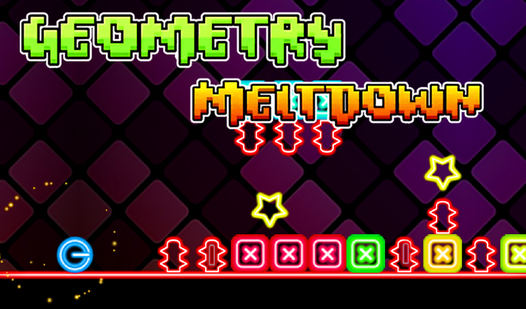
- Neon sensory overload: The visuals pulse with your movement. It looks slick but occasionally makes it hard to see the incoming spikes.
- Speed-based physics: Your momentum carries you through jumps. You have to account for that drift or you’ll overshoot the landing.
- Pattern memorization: Levels aren't random. You learn the rhythm to survive.
- Brutal difficulty spikes: Expect to restart constantly. The game doesn't care about your progress.
How to Play
Mastering Geometry Meltdown controls
Geometry Meltdown controls rely on simple taps or clicks to leap over obstacles. You need to time these jumps perfectly or you’ll crash into the scenery. Learning how to play Geometry Meltdown means understanding that holding the button too long messes up your landing trajectory every single time.
Surviving Geometry Meltdown obstacles
Avoid the neon blocks at all costs. If you clip a hitbox, you’re resetting to the start of the zone. The common mistake is panicking when the speed kicks up. Stay calm. The later levels turn into a total nightmare of shapes, so memorize the patterns before you rage-quit.
Who Should Play Geometry Meltdown?
Frequently Asked Questions about Geometry Meltdown
Can I play Geometry Meltdown on my phone?
Yes, you can play this on your mobile browser. The touch controls feel responsive enough for the faster sections, though the screen space gets a bit cramped during late-stage runs.
How many levels does Geometry Meltdown have?
There are several distinct stages that ramp up in complexity. Each one adds new visual distractions meant to trip you up while you try to navigate the geometry.
Is Geometry Meltdown free to play?
Yes, Geometry Meltdown is completely free to play on Nub Games. There are no in-app purchases. No download or registration required.
Can I play Geometry Meltdown on mobile?
Geometry Meltdown works on both desktop and mobile devices. Best played in landscape mode.
What age rating is Geometry Meltdown?
The catalog age rating for Geometry Meltdown is 6+.