






Key Features
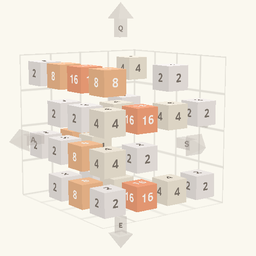
- Rotating perspective: The entire board spins, forcing you to track tiles across multiple sides. You lose your place constantly.
- Spatial logic: Merging requires thinking in three dimensions rather than just flat rows. It turns your brain into soup.
- High stakes: One bad move ruins the entire run. You have to start over from scratch.
- Clean visuals: The minimalist look keeps the focus on the numbers. It is free of unnecessary clutter.
How to Play
Mastering the 2048 3D grid
To learn how to play 2048 3D, you need to understand that the cubes don't just slide; they shift between faces. Use the WASD keys or tap the arrows on your screen to shift those numbered blocks. The 2048 3D controls feel a bit loose at first, so don't be surprised if you accidentally merge the wrong tiles early on.
Winning 2048 3D strategies
Keep your highest numbers tucked away in a corner of the cube to prevent them from getting stranded. A common mistake is filling up the center too quickly, which leaves you zero room to recover when a bad spawn happens. Once you hit the higher numbers, the board gets crowded and you will definitely start sweating.
Who Should Play 2048 3D?
Frequently Asked Questions about 2048 3D
Can I play 2048 3D on my phone?
Yes, the game is fully compatible with mobile browsers. Just use the on-screen arrows to shift the blocks instead of your keyboard.
What are the controls for 2048 3D?
You use the W, A, S, and D keys or the Q and E keys to rotate the cube on a PC. Mobile players can just tap the arrows.
Is 2048 3D free to play?
Yes, 2048 3D is completely free to play on Nub Games. There are no in-app purchases. No download or registration required.
Can I play 2048 3D on mobile?
2048 3D is currently available on desktop only. Best played in landscape mode.
What age rating is 2048 3D?
2048 3D has a content rating of 0++. It is suitable for all ages.